
There’s a reason that Merriam-Webster selected “slop” as its word of 2025. From the mundane (75% of my LinkedIn feed), to the nightmare fuel (Grok creating non-consensual porn), generative AI is unavoidable. I’m at the point where I see more than one em-dash and/or oddly used emoji and my brain shuts down. Don’t put AI in my Google searches. Don’t put AI in my refrigerator. For the love of everything, cite your sources.

My daughter and I went to lunch the other day and the restaurant’s kiosk had AI-generated images for their menu items. It was so disturbing, we almost went somewhere else. We were just barely hungry enough to cross the Uncanny Valley, but I don’t plan on going back there.
Ok, fine, I’m a hater.
But not every form of AI is awful. Some of it is even useful.
Here are some useful ways that you can use Artificial Intelligence:
Analyzing Log Files
AI often excels where our human brains go “no more!” and stop functioning. Sifting through large amounts of data is best left to the machines. AI can analyze device logs to detect hardware problems before anybody notices. It can also be used for security audits to detect malicious activity. The IT industry has been using AI to do this for years, nay a decade now. This is what your anti-virus program is probably doing under the hood. Intrusion detection services do this as well.
To get a bit simplistic, AI isn’t so much intelligent as it’s pattern recognition. Feed it examples of equipment in a fault state and it will go “aha! these 16 errors are all correlated with this problem.” (Except without the aha part. Because, again, not actually intelligent) Then, when the same 16 errors occur, you get an alert. This is usually a good thing. My husband (Kristian) is an IT security consultant and he has multiple examples of this type of early warnings preventing bad outcomes. Worst case scenario? The system is a little too sensitive. A human has to double check what’s going on and clear false positives out. Work with a trained professional to get that sensitivity dialed in correctly. An early warning system is useless if everyone tunes it out.
Transcription (With Human Checks)
There’s no getting away from it. AI hallucinates and makes things up. But, I’ve been using Copilot to transcribe and summarize Teams meetings for about a year now, and it’s accurate enough to create decent meeting notes. After a double-check with my human eyes, of course. Turning on transcription is a great way to make sure that nobody misses anything. If I join a meeting late (or my ADHD brain zoned out for a second and missed something), I’ll ask Copilot to catch me up without having to interrupt the other participants. Especially if it’s a large meeting.
I still try to take my own notes. Studies have shown that our brains make better connections when we write everything out ourselves. If you really want to remember something, you should write it out by hand. But for the purposes of most business meetings, typing things out in the notes section is enough to help you synthesize all of the information,.
A few tips for better transcription:
- If the meeting is in a language other than English, update the language in settings for better accuracy
- You can turn on captioning to help you process what other people are saying. This is great for folks with ADHD (we are very much a “captions on the TV all the time” kind of family) but is also helpful if the meeting is in a language other than your native one. Give me real-time captions and I can follow along with a meeting conducted in French.
- Always double check the summary! Most of them are pretty repetitive, but it’s always easier to delete things than to write them yourself.
- Copilot does not understand sarcasm. If you’re as sarcastic as I am, you definitely want to mark the bits where you were being facetious, otherwise your coworkers will think that you’ve said some pretty outrageous things. Unfortunately, I know this one from experience.
- The meeting summary will give you a little graph of who spoke, and when. Please look at that graph and make sure you aren’t dominating the conversation.
Translation
I wouldn’t use AI for anything where understanding and nuance are paramount, but it’s impressively accurate for everyday use. My family moved to France last fall, and we’ve all been using machine translation when our French skills aren’t up to a task.
If we’re not sure what everything on a menu is, we can pull out our phones and use a translation app (I’m partial to DeepL) to scan the menu. It will show you the translated text overlayed on top of the image, which helps with context. This has saved me from eating so many mushrooms. (Sorry, foodies, I’m a mushroom hater).
My husband tried out the simultaneous translation using his Airpods (my phone is too old to use the feature) and it was hit or miss. It didn’t work well in a large group meeting at our daughter’s school. There were too many people speaking all at once and the pace was so rapid, he couldn’t keep up. He put his phone on the table and let one of the other moms read the translations and she followed along much better. It was like having real-world subtitles. It’s a shame that the feature only works when your Airpods are in your ears. Conversely, he was able to use the same feature when meeting with a realtor about renting our apartment. In that case, it was one-on-one and the realtor spoke slowly. Kristian was also able to speak in English and then show the translation in text on his phone to the realtor.
A few tips for better language translation:
- Chunk your translations up into sections if you can. You won’t learn anything if you translate an entire document. I let my daughter use Google Translate for her homework as long as she does it a sentence at a time. The process of identifying what each word means is how we’re all improving our vocabulary.
- Conversely, try to avoid translating a single word. Even if you know the rest of the sentence, you don’t want to miss out on context. Many words have multiple meanings and those meanings don’t always overlap.
- When in doubt, Google it out. If you’re not sure about a specific word, it’s best to Google for the definition. For example, if you put “excited” into Google translate, it will tell you that the French translation is “excitée.” Which also has the connotation of… horny. Save yourself from being Emily in Paris. On the first page of Google results, I got this:
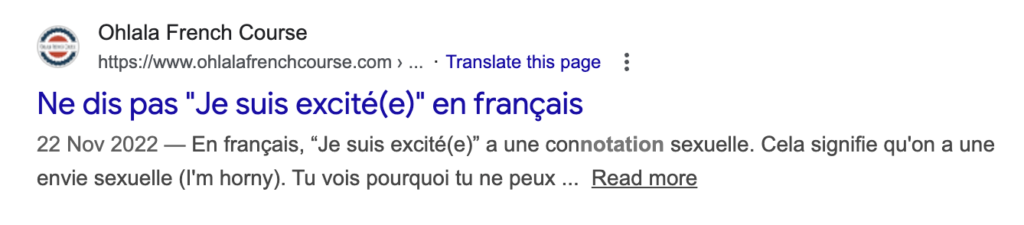
- Remember, always type in full sentences if you can. If you ask for the translation of “I’m excited to see you,” the translation comes back as “J’ai hâte de te voir.” Not a sexual connotation in sight. Context matters!
Touching Up Photos
I don’t want to look like a face-tuned influencer, I just don’t want anybody to see the random person standing behind me. Pretty much every photo app out there now has a built-in feature where you can click on the person in the background making a stupid face and make them disappear. Does it let us slightly bend reality to our whims? Yes. But does it also let me use a slightly more polished photo as my LinkedIn headshot? Also yes.
Just don’t do one of those AI-generate headshots. Those are creepy AF.
Generating Alt-Text
Using alt text is the kind thing to do. It puts placeholder text where your images are, to help out folks who have visual impairments or slow internet connections. My only problem? I never have any idea what to write. I’ve started using an AI text generator on my blogs to put the descriptions in for me. They tend to be overly flowery (it’s either that, or every photo that I take is incredibly cozy), but 99% of the time the descriptions are spot-on. It’s way easier to make minor edits and delete purple prose than it is to write something brand-new.
My Final Thoughts
What do all of these things have in common? They’re nice to haves. None of them (with the exception maybe of translation) is necessary. I find that AI tools work best if I use them to augment my existing work. I don’t let AI write my social media posts for me, but I might use it to take a page of writing and turn it into a blurb. And then I edit that blurb, because otherwise you end up with some absolutely unhinged adverbs.
I don’t think that AI can replace us, because it’s the human element that makes things more interesting. AI generated photos of food are completely unappetizing, but just about every program for retouching photos has built-in AI tools to speed up our work flows. Just yesterday, I used Adobe Lightroom to remove a hard hat logo on a photo for the Corvid AVL site. I could have done it myself in Photoshop, but it would have taken me a lot more time. And, let’s be honest, it probably wouldn’t have looked as good.
I have my qualms about AI, especially the generative kind. It doesn’t get called the plagiarism machine for nothing. And the environmental impacts are downright scary. I don’t think we should put AI in everything. I don’t think that we should be using it to generate art or books or music. But I do think that it can be a helpful tool, when used thoughtfully.